
SET UP. CHECK. GET BACK OUTSIDE.
60W Solar Camping Table Setup & Troubleshooting
Set up model 802640V01, position the solar tabletop for direct sunlight, choose the right USB port and work through common charging or stability issues.
Choose a different product
Stop using the table if the frame or tabletop is unstable, cracked or visibly damaged. Keep the junction box, ports and plugs dry. Do not sit on the table, place a stove or hot cookware on the solar surface, or connect a laptop directly to the solar tabletop.
QUICK ANSWERS
Know these four things first.
- 60W is the panel rating under STC: actual USB output changes with sunlight, panel angle, shade, temperature, cable and device requirements.
- Three confirmed USB outputs: USB-C PD up to 45W, one USB-A QC3.0 port up to 18W and one USB-A port at 5V / 2.4A maximum.
- The table does not provide confirmed energy storage: use a compatible power bank if you need to store daytime solar energy for later.
- Model 802640V01 weighs about 11.9 lb / 5.4kg with accessories: the tabletop folds in half and the frame collapses separately.
GET TO KNOW YOUR GEAR
Start here.
These steps use the currently published product guidance and product images. Select an image to view it larger; check the supplied user manual for any details not shown here.
Open the frame on level ground
- Remove the separate frame from its carrying bag.
- Choose firm, level ground away from traffic, flame and standing water.
- Open the cross-braced frame fully and seat each support before adding the tabletop.
- Check that the feet do not rock or sink.
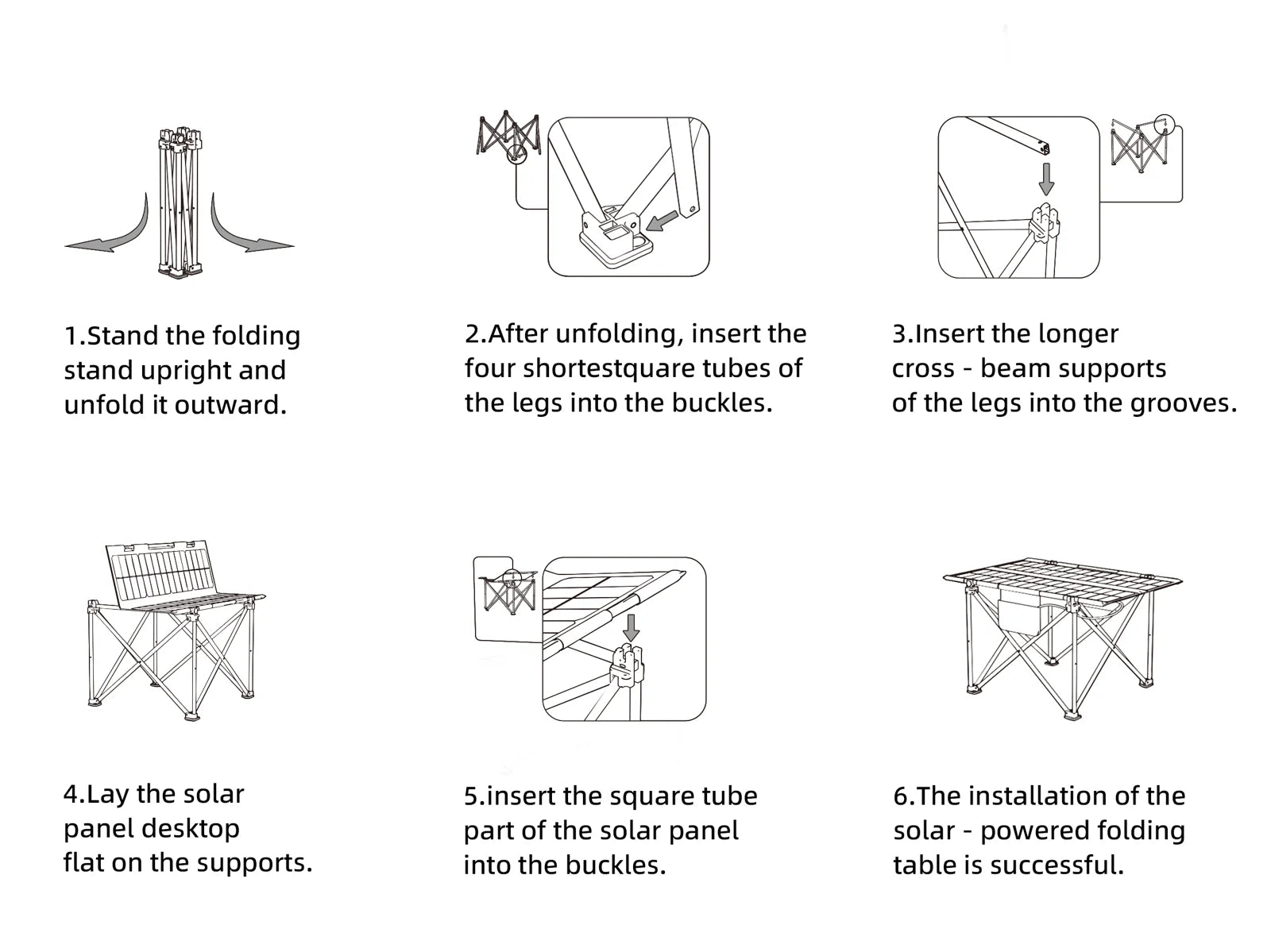
Open and stabilize the frame before fitting the solar tabletop. Unfold and secure the solar tabletop
- Lift the folded tabletop with both hands and keep fingers clear of the centre hinge.
- Open the two panel sections only along the intended hinge.
- Locate the tabletop on the frame at the fixing points shown in the assembly image.
- Confirm that every support is seated and the tabletop is stable before use.
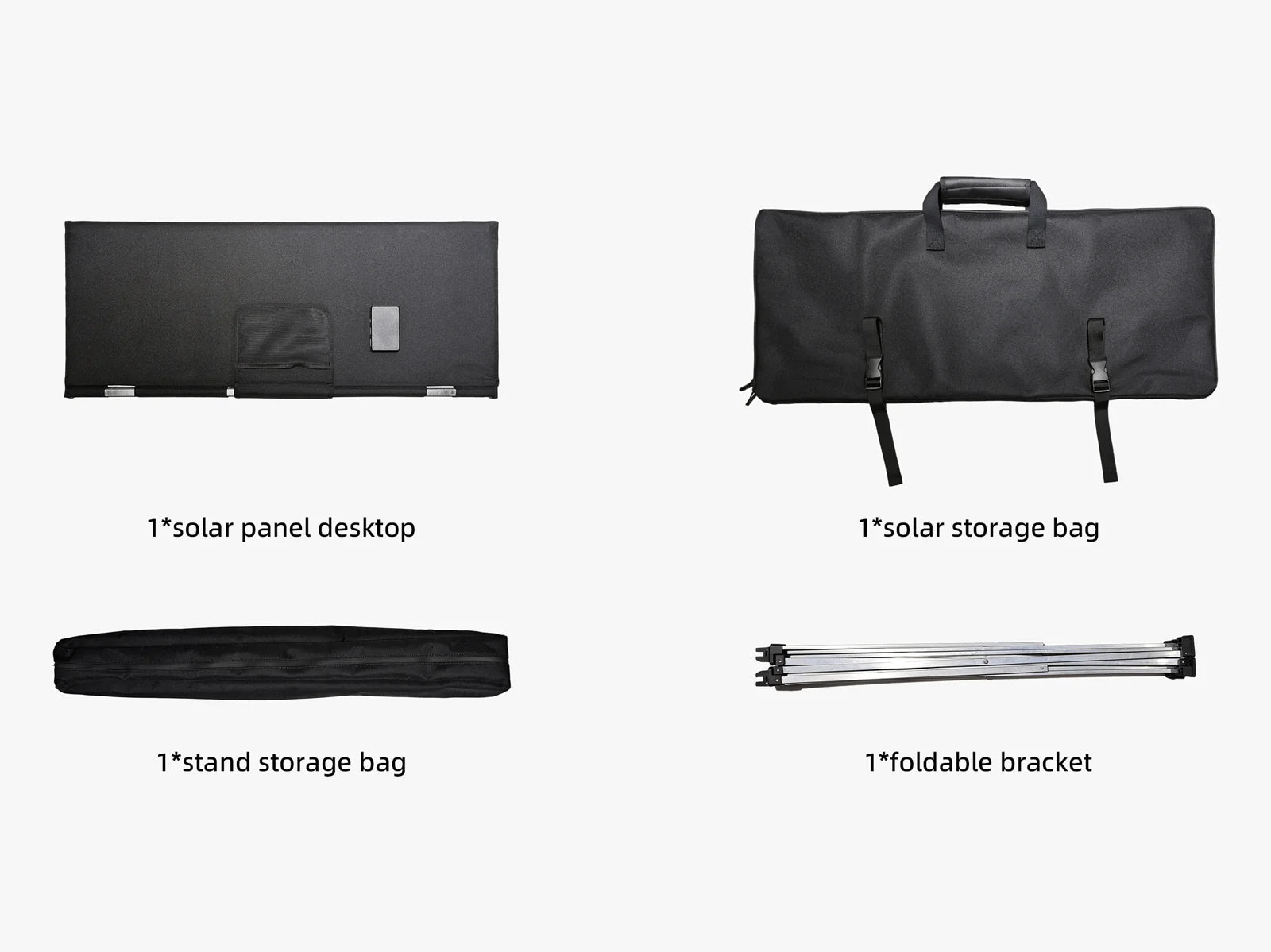
The tabletop folds in half; the collapsible frame packs separately. Give the tabletop clear, direct sunlight
- Place the solar cells in unobstructed direct sunlight.
- Move the table away from shade cast by trees, tents, awnings, vehicles or people.
- Keep bags, cookware and other objects off the cells while charging.
- Recheck the sun and shade position during the day because moving shade can interrupt output.

The full solar surface needs usable sunlight; covered cells can reduce output. Choose a USB port for the device
- Check the device input and use a known-good compatible cable.
- Use USB-C PD for a compatible USB-C phone, tablet, power bank or small device that accepts one of the supported profiles.
- Use USB-A QC3.0 for a compatible quick-charge device, or the 5V / 2.4A USB-A port for standard USB charging.
- Keep the connected device shaded and dry while the tabletop remains in sunlight.
Do not add individual port ratings together as a guaranteed multi-port output. DC5521 power direction and power-station compatibility remain unverified.
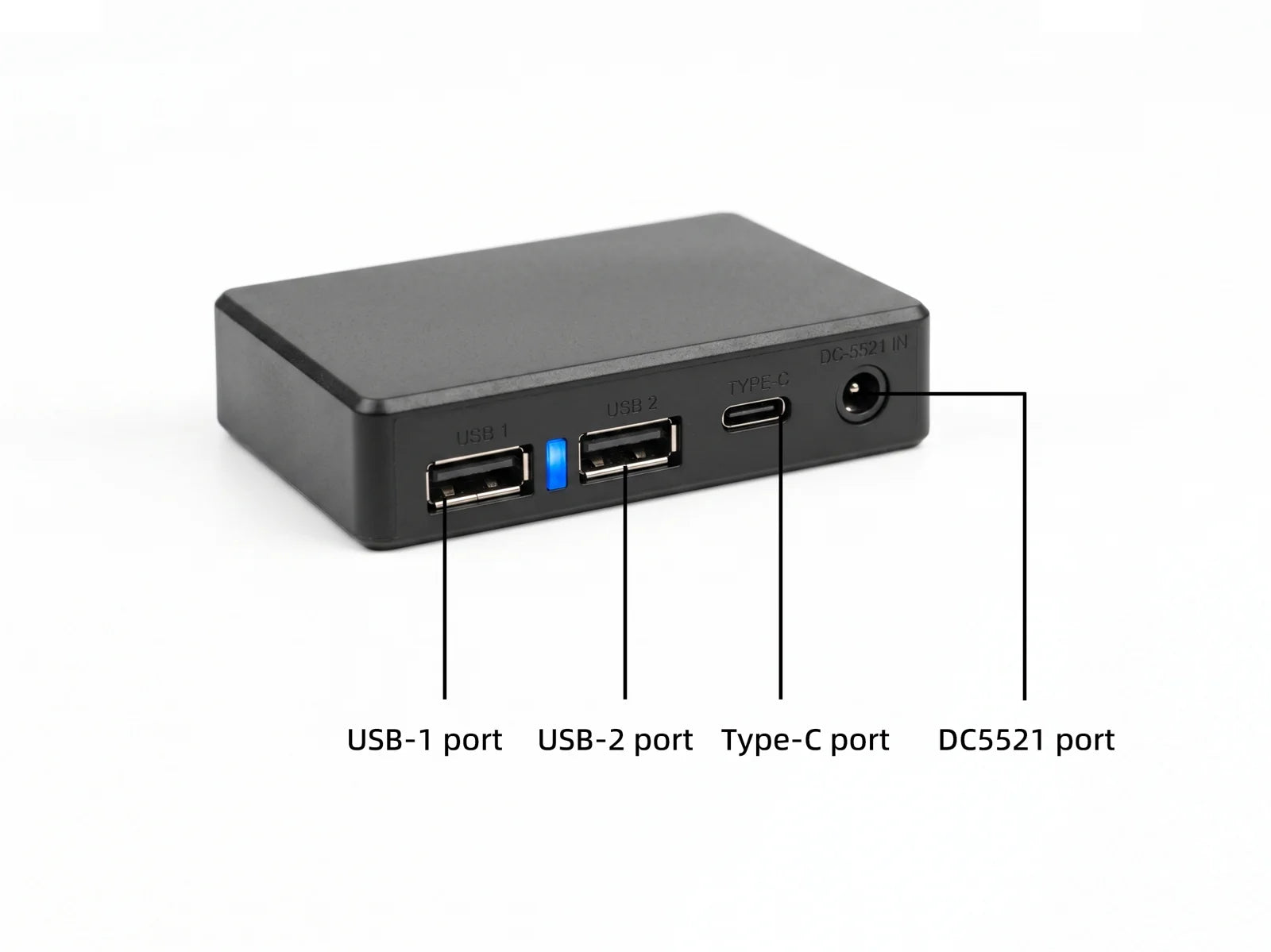
Use the confirmed USB outputs; DC5521 compatibility is not confirmed. Disconnect, clean and pack each part
- Disconnect every cable and remove all items from the tabletop.
- Wipe away dirt or moisture and let the table dry fully.
- Remove the tabletop, fold it only at the centre hinge and place it in its bag.
- Collapse the frame without forcing the braces and place it in the separate frame bag.
Dry and pack the tabletop and frame separately.
FIND YOUR SYMPTOM
Let's work through it.
Open the question that matches your issue. These checks do not require opening or repairing the electronics.
Why is my solar camping table not charging a device?
Check in this order
- Move the tabletop into unobstructed direct sunlight.
- Remove every object or shadow covering the cells.
- Reconnect a known-good cable to a confirmed USB output.
- Check that the device accepts that port's voltage and charging protocol.
- Test one device at a time.
What to look for: Charging should begin when usable sunlight, a compatible USB port, cable and device are present. Output can stop when shade or clouds reduce the available solar power.
If it is still unresolved: Send the port, device, cable, weather, shade conditions and a photo of the setup. Do not open the junction box.
A01 port specifications and supplied product guidance; no all-weather output guarantee is claimed.
Get help with this product ↓Why is USB-C PD or phone charging slower than expected?
Check in this order
- Confirm the tabletop receives strong direct sunlight across both panel sections.
- Remove partial shade and improve the panel's exposure.
- Use a USB-C cable rated for the device's required power.
- Check the device's own charging limit, temperature and battery level.
- Keep the phone or power bank out of direct sun so it does not reduce charging because of heat.
What to look for: The 60W panel rating and 45W USB-C maximum are not guaranteed charging speeds. Actual power depends on sunlight, temperature, cable, charging protocol and the device.
If it is still unresolved: Provide the exact device model, cable rating, port used and sunlight conditions. No fixed phone charging time is promised.
Model 802640V01 A01 specification and verified product-page charging boundaries.
Get help with this product ↓Does shade or cloudy weather affect solar table charging?
Check in this order
- Check for shade from tents, trees, vehicles, people or items on the tabletop.
- Move the table into clearer sunlight.
- Reconnect the device after sunlight improves if charging does not restart.
- Use a compatible power bank to collect energy when sunlight is available if power is needed later.
What to look for: Shade and weaker sunlight can reduce or interrupt charging. No cloudy-weather output or automatic restart behavior has been verified for this model.
If it is still unresolved: Record whether charging resumes in clear direct sunlight with one compatible device and a known-good cable.
A01 calls for unobstructed outdoor sunlight; cloudy-weather performance is unverified.
Get help with this product ↓Does the 60W solar table store power or charge at night?
Check in this order
- Do not expect the tabletop to provide solar output after usable light is gone.
- Connect a compatible power bank during suitable daytime sunlight if energy is needed later.
- At night, disconnect the solar tabletop and use the power bank according to its own instructions.
What to look for: The product has no confirmed built-in battery or independent night-time charging function. A power bank shown in a lifestyle image is not proof that it is included.
If it is still unresolved: Contact support before purchase if you need help checking a power bank's USB input and your later-use requirements.
The A01 specification lists panel and port ratings but no battery capacity.
Get help with this product ↓Can I connect a laptop directly to the solar camping table?
Check in this order
- Do not connect a laptop directly to the solar tabletop.
- Use the table in sunlight to charge a compatible power bank first.
- Disconnect the power bank from the table.
- Use a power bank with an output and cable that meet the laptop manufacturer's charging requirements.
What to look for: The supported method separates variable solar input from laptop charging. A 45W USB-C port rating alone does not establish universal laptop compatibility.
If it is still unresolved: Check the laptop input and power-bank output specifications with their manufacturers before use.
LINKSOLAR support rule: solar panels do not connect directly to laptops.
Get help with this product ↓Why do multiple devices not charge at full speed together?
Check in this order
- Disconnect all devices.
- Test one compatible device on one confirmed USB port.
- Add a second device only after the first connection is stable.
- Do not assume that each port can deliver its individual maximum simultaneously.
What to look for: Individual port ratings cannot be added together as a guaranteed combined output. Simultaneous power-sharing behavior has not been verified.
If it is still unresolved: Send the connected device models, ports used, cable types and sunlight conditions.
A01 lists individual port limits but no verified simultaneous-output rule.
Get help with this product ↓What should I do if the folding table feels unstable?
Check in this order
- Remove every item and disconnect cables.
- Move the table to firm, level ground.
- Confirm the frame is fully opened and every support is seated.
- Check that the tabletop is located at the correct fixing points.
- Inspect the frame, feet, braces and tabletop for visible damage.
What to look for: The table should stand evenly without rocking before anything is placed on it. Maximum load capacity is 66 lb / 30kg. Do not sit or stand on the table.
If it is still unresolved: Stop use if any brace, foot, hinge or fixing point is bent, loose, cracked or missing; contact support with photos.
Supplied assembly imagery; 30kg maximum load confirmed by LINKSOLAR on November 3, 2026.
Get help with this product ↓What should I do if the ports or solar tabletop get wet?
Check in this order
- Disconnect every device and cable.
- Move the table to a dry, ventilated place.
- Wipe external moisture with a soft cloth.
- Let the junction box, plugs and ports dry completely before reconnecting anything.
- Do not use heat, pressure washing or tools inside a port.
What to look for: No waterproof rating has been verified for this model. Wet electrical connections must not be used.
If it is still unresolved: Stop use and contact support if water entered the junction box, corrosion is visible or charging behavior changes after drying.
Current product verification boundary: no published waterproof rating.
Get help with this product ↓Can I place a camping stove or hot cookware on the solar tabletop?
Check in this order
- Remove the stove, burner, hot pan or kettle from the solar surface.
- Use a separate surface specifically rated for cooking heat.
- Inspect the PET surface for discoloration, warping, cracking or other damage.
- Do not charge devices if the panel or junction box is visibly damaged.
What to look for: Surface heat resistance has not been verified. A stove shown in a lifestyle scene is not a heat-resistance test.
If it is still unresolved: Stop using a damaged tabletop and contact support with clear photos of the affected area.
A01 identifies a matte PET surface; no stove or hot-cookware rating is supplied.
Get help with this product ↓Can I connect the DC5521 port to a portable power station?
Check in this order
- Do not connect a power station to the DC5521 port yet.
- Use only the confirmed USB outputs for compatible devices.
- Wait for LINKSOLAR to verify power direction, polarity, allowed voltage range and cable compatibility for the exact power station.
What to look for: The A01 sheet lists DC5521 at 18.1V / 58W, but the supplied junction-box image is labelled IN. That conflict prevents a safe compatibility claim.
If it is still unresolved: Send the power-station brand, model, input specification and connector details to support before connecting it.
Unresolved A01 versus junction-box-label conflict retained; no DC5521 compatibility is claimed.
Get help with this product ↓KEEP IT READY
Care & storage.
Wipe the matte PET solar surface with a soft, slightly damp cloth, then dry it fully. Keep the cells clear of dirt and objects while charging. Do not use solvents, abrasive cleaners, pressure washing or corrosive substances.
Protect the panel from scratches, impact and excessive bending. Keep the junction box, USB ports and plugs dry; no waterproof rating has been verified for this model.
Fold only along the intended centre hinge and pack the tabletop and frame in their separate carrying bags. For long-term storage, the A01 specification lists 50°F to 95°F / 10°C to 35°C and humidity at or below 60%.
For choosing a campsite layout, see how to choose a folding camping table, solar table versus a separate panel and the solar USB charging guide.
Maximum load: 66 lb / 30kg. Do not sit or stand on the table. Whole-table warranty: 1 year. Contact LINKSOLAR with your order details and a description of the issue for warranty support.
Manufacturer-supplied A01 specification dated October 5, 2023, model 802640V01, plus the supplied assembly and product images. Reviewed November 2, 2026.
MORE PRODUCT DETAILS
Review the product page.
A downloadable PDF for this model has not yet been added to the website. Use the product page and the instructions supplied with your product for complete model-specific guidance.
View product details ↗STILL NEED A HAND?
Tell us what happened.
This request includes your product: 60W Folding Solar Camping Table.
Include model 802640V01, the port used, connected device and cable, sunlight and shade conditions, indicator or charging behavior, and the checks already tried. We may request photos or a short video by email.
Do not include passwords, payment details or identity documents.